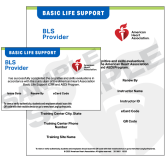
We get a lot of inquiries about claiming, viewing, or needing a copy of an AHA eCard. Both from participants in our classes and employers. While you can certainly contact us, it’s faster for you to look it up yourself. Here’s how you can access the eCard:
Go to: https://ecards.heart.org/student/myecards
For course participants:
- Enter either your name or your email. It must be entered exactly as you entered it on your course registration, sign-in link, or roster form. I.e. Jane E. Smith must be entered as First Name: Jane E. Last Name : Smith. periods (or lack of with initials) count. We do not use titles.
- Or enter your email address. Must be the email you provided on your course registration, sign-in link, or roster form.
- Your eCard record will display. If you have not claimed your eCard you can do so. Once claimed you can download or print your eCard.
- You will have access to your eCard through the above link and login or through your Atlas account (if you have one, not required) while your eCard is valid.
You may need to create an account, its free to do! If you have an account you will need to log in.
For employers:
- Click on the employer tab. Enter the eCode certificate number in the box. You can enter more than one number if you are checking on multiple employees.
- The next view will show the eCard record. You can click on the links to download or view the eCards. You see a status of ’emailed’. That means the employee has not yet claimed their eCard. Please feel free to encourage them to do so. If they did not receive the eCard email, they can use the directions in this post to claim their eCard.
- If you do not see your employee’s eCard record, or if the information displayed is incorrect, please contact us.
That’s it!
How to claim or view your AHA eCard